Cloud infrastructure / Web / 2014
Building AWS Config: navigating cloud changes through time.
The first product in a new line of AWS tools to assess, audit, and evaluate the configuration of your cloud resources — and a timeline that lets customers see exactly what changed, and when.
This portfolio showcases my personal work and design projects. While some content may reference my professional experience at AWS, all views, opinions, and designs presented here are my own and do not reflect the official policy or position of AWS. Any data or information displayed is either publicly available or has been anonymized to protect confidentiality. This portfolio is intended solely to demonstrate my skills and experience in UX design.
01 / Overview
What it is
AWS Config was the first product in a new line of AWS cloud computing tools designed to assess, audit, and evaluate the configurations of your AWS resources.
Imagine this…
Once upon a time, there was a kid named Alex who had a big toy room. Every day, Alex played with toys, moved them around, and sometimes gave some away or got new ones. But Alex's mom wanted to keep track of what toys were in the room and what changed every day — so she got a magic notebook called AWS Config.
Every time Alex took a toy out, put a new toy in, gave a toy to a friend, or changed where a toy was, the magic notebook wrote it down with the date and time. So if one day a toy went missing, Alex's mom could look at the notebook and say: "Aha! On Tuesday at 3 PM, Alex moved the red fire truck under the bed!"
In the real world, people use AWS Config to track changes to their resources in the cloud — servers, databases, and more. Just like Alex's toy room, they want to know: what changed, when did it change, and who changed it? The timeline helps them see the story of those changes so they can fix problems or understand what happened.
02 / The brief
A four-month sprint to launch
Based on a series of interviews and user surveys with AWS customers, there was strong demand for a monitoring and evaluation service that continuously tracks AWS resource configurations and automates the assessment of those configurations against desired standards.
My goal was to design the entire new AWS Config console from beginning to end, ahead of its release at re:Invent. Some of the qualitative data from the interviews revealed that AWS customers wanted to:
- Discover the AWS resources that exist within their account at any point in time.
- See how changes occurred in the past, visually.
- Keep track of and localize resource changes over time — a common difficulty.
- Troubleshoot why a resource may have stopped working properly.
03 / Results & impact
Launched on time and validated through testing
100%
On-time launch at AWS re:Invent 2014.
7/7
Usability participants successfully navigated the timeline.
4
Design iterations driven by user feedback.
1M+
Active customers using AWS Config today.
04 / My role
Leading design end to end
- Conduct research: understand potential users' goals and needs to determine product value.
- Collaborate across disciplines: lead one-hour Design Studio workshops to sketch solutions around a focused scenario and a prioritized set of features, uncovering use cases and ideas.
- Deliver design decisions: guide the team through incremental decisions, delivered as conversations, sketches, whiteboard sessions, wireframes, mockups, or prototypes.
- Seek feedback: constantly share work with users, stakeholders, and design peers to gather feedback.
- Communicate early and often: as part of a balanced Agile team, act as leader, facilitator, and educator on how the product should act and look.
05 / Understanding the user
Questioning our assumptions
We began by exploring our assumptions about how users discover the AWS resources in an account at any point in time. Our first reaction was to provide a date-picker control to navigate through time — but after speaking to users, we found a better approach.
Next, we wrote questions to prompt interviewees to tell their story in their own words, to learn what mattered to them when looking for configuration across different AWS resource types. The first round of interviews produced clear trends:
- A simple way to navigate through time to see changes.
- The date picker was the wrong UI for looking for dates.
- A relationship between configuration details for each resource and time.
- Visuals to give users a clear view of changes.
- A provisional persona, based on PM knowledge and my understanding of the user, that I returned to throughout the project to guide decisions and priorities.
"As a system administrator I want to navigate in time to inventory resources in my account, understand current and previous configurations, and evaluate how a configuration change to one resource affects related AWS resources."
Darlene Robertson · System Administrator
06 / Prior attempts
What else had been tried
It was challenging to design a tool for navigating through time without breaking some UXDG patterns. The first unsuccessful attempt used only UXDG components.
I built the prototype in Axure RP. To get more accurate feedback, I uploaded the Axure files to my personal server so participants could access the prototype from a mobile device — a very realistic testing experience.
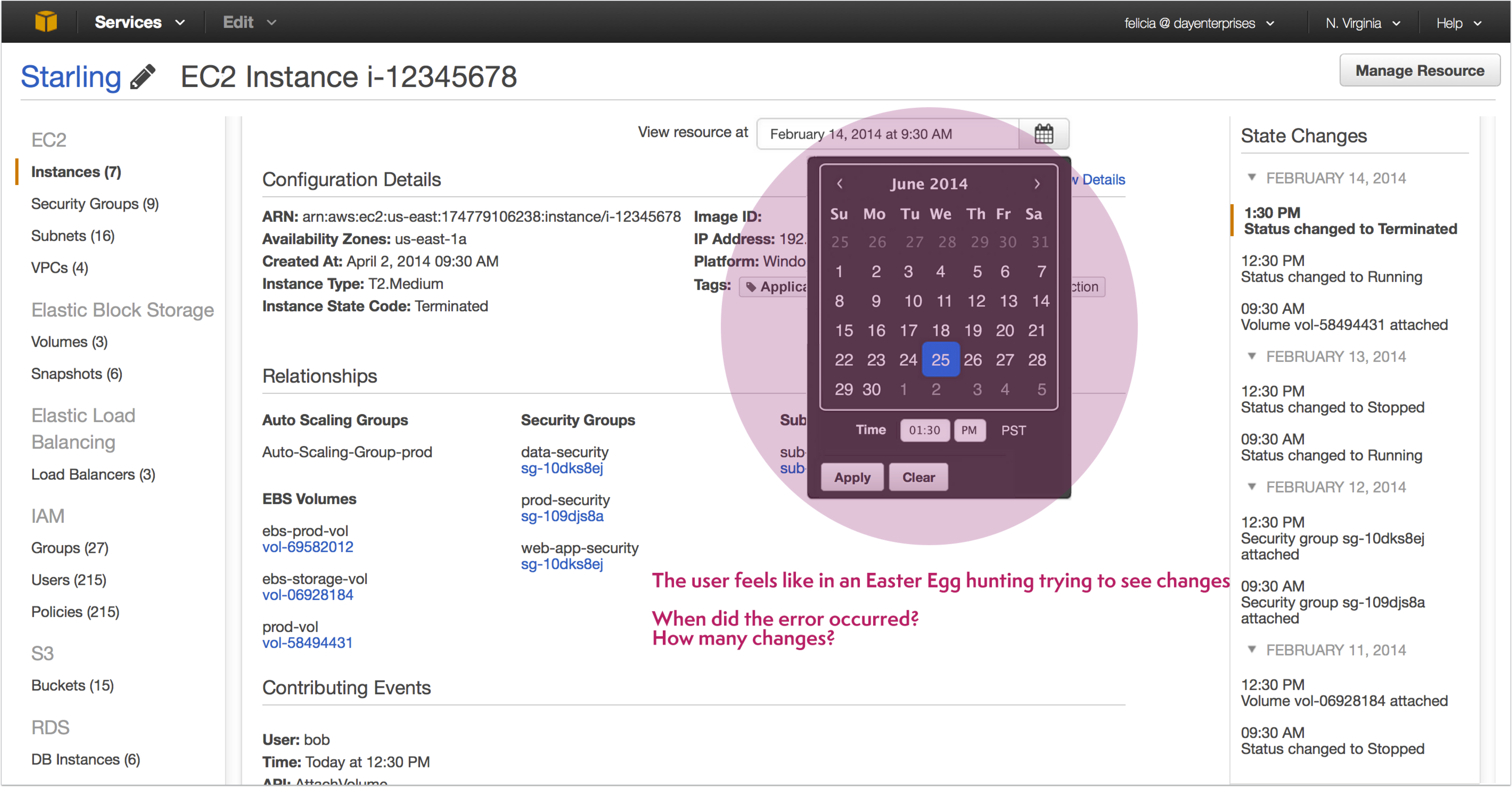
Feedback suggested investigating a more intuitive, aesthetic way to navigate through time. Users told us a date picker — an input control where you enter data to get a result — felt like an Easter-egg hunt when trying to see changes. Instead, we needed a control that helps users visualize a series of changes over time without entering any input.
07 / Design artifacts
Defining success before designing
Before jumping into design, it was important to define success and understand the requirements. Given the complexity of the system, creating a task flow helped me represent the logical sequence of the user's journey from the starting point to accomplishing a task.
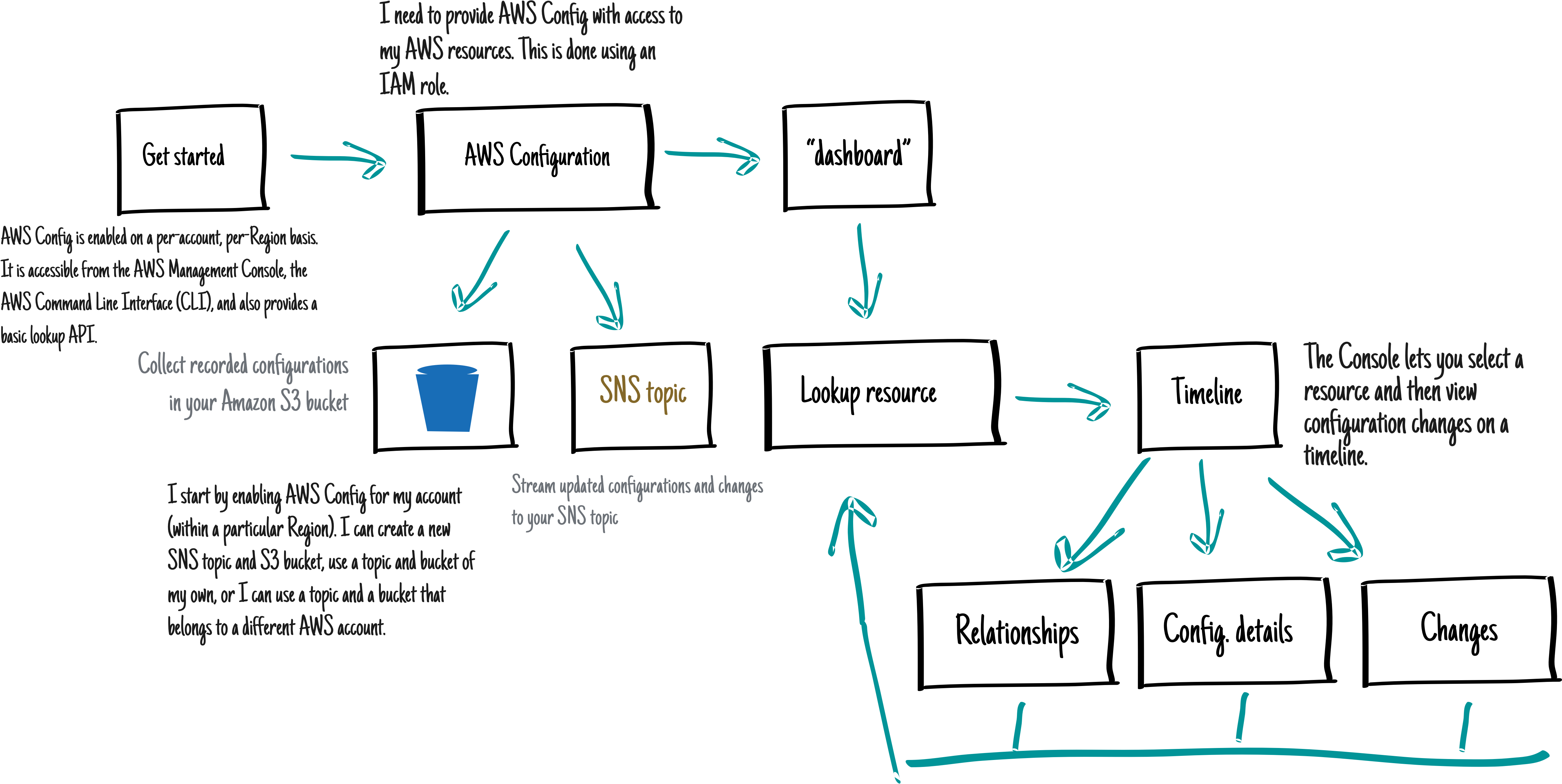
I use task wireframes constantly during early prototyping because they present the flow and interactions without spending time on an interactive prototype. Each task is explained so stakeholders can review and comment, and once approved I start on a high-fidelity prototype developers can visualize and interact with.
"…how might we help customers navigate through time?"
The question that led to the timeline
This begged the question: how might we help customers navigate through time? My proposal was a timeline.
08 / Prototyping
From Axure to HTML
Prototyping was the most effective way to gain meaningful feedback from the team, consensus from stakeholders, and approval from senior leadership. I could easily distribute prototypes as videos and reuse them for usability testing.
For the first prototype I used Axure RP, mostly because of the limited time I had to turn the idea into a playable artifact. One problem, though, was Axure's animation limitations — it was hard to match the effect we wanted when navigating between pages using the direction controls.
HTML to the rescue
If you're building a prototype for the web, it makes sense to build it in its natural environment — it's as real an experience as you can hope to achieve. Understanding how to build your designs also gives you a greater affinity with developers: they're more open to your ideas and better able to communicate theirs.
It also lets you take full advantage of everything the web offers. Your prototype can adapt to the width of the browser window — a graphic wireframe can't — which is useful when demonstrating how a design adapts across screen widths.
09 / Story of a timeline
Iterating on the hardest UI
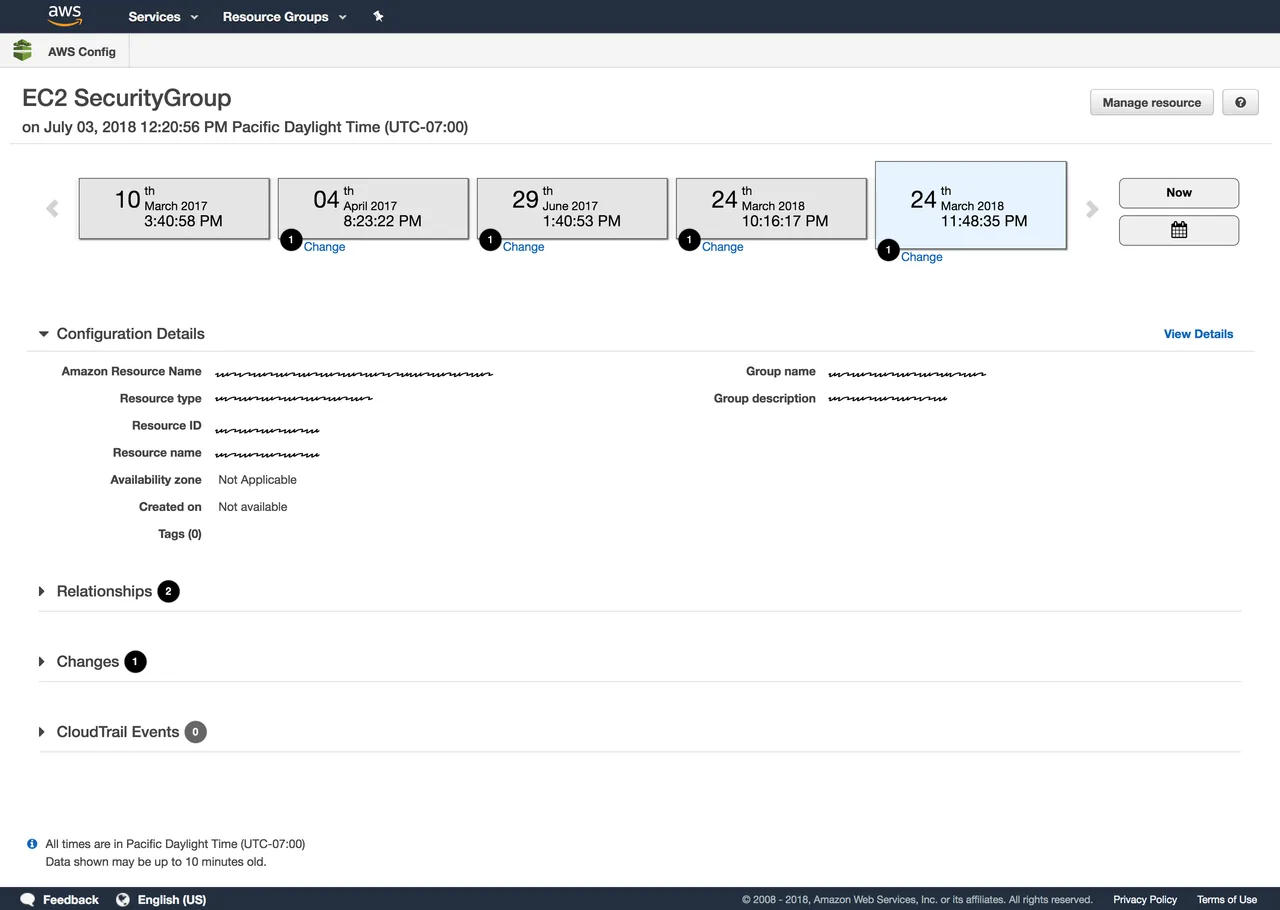
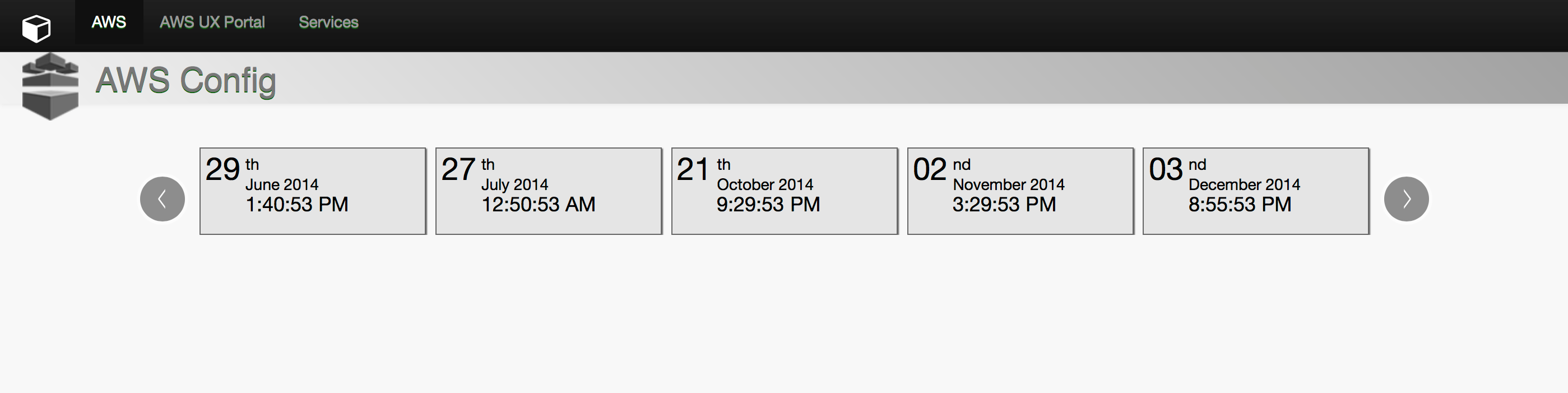
The different iterations, based on user feedback, all centered on one of the most critical UI pieces of AWS Config: the timeline.
1. Just request and we do the rest
We had to make sure users would understand the time-navigation concept. I was surprised by the issues we found testing the first concept — the main problem was locating the "change point" indicators on the timeline. We wanted users to understand that changes happen at the beginning of a period of time; when the change point sat in the middle of the time block, it confused people about when the change occurred.
Solution: we justified the change-point marker to the left. Even though it seems like a complex concept, users did understand it with the change indicator in the left position on the time block.
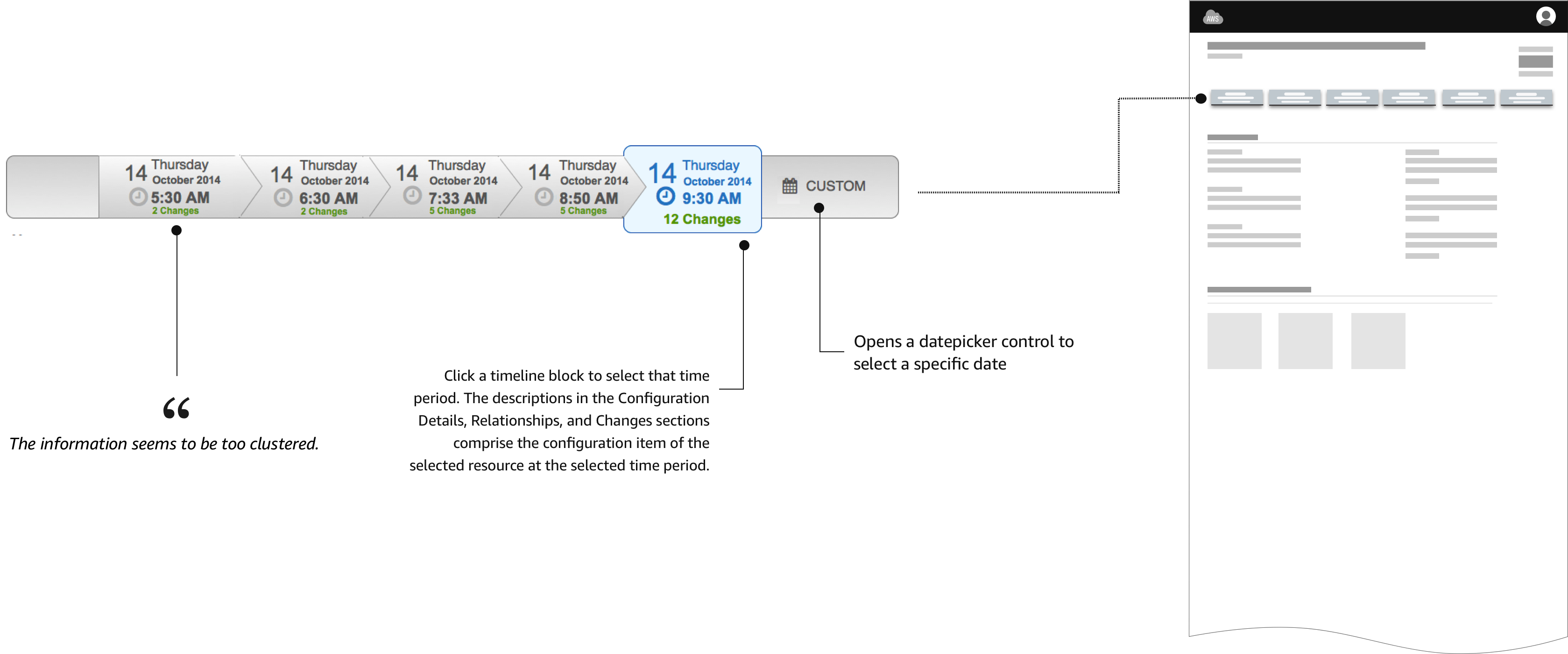
"…the information seems to be too clustered."
Usability test participant
2. We've got your back
The next variation displayed all possible information inside a time block, including the number of changes. The problem: grouping everything made it harder for users to scan for a specific type of information.

"…is this a flowchart?"
Usability test participant
3. Starting point
Another concept displayed a starting and ending point with changes in the middle. Adding a starting point created confusion — its position could vary, generating a continuous "jumping around" effect that disoriented users. The solution was to position the starting point always at the beginning of the timeline (left side).

4. Goodbye flowchart
A new approach eliminated the flowchart feeling of previous designs. The arrows on the time blocks produced a flowchart effect rather than a timeline, and their direction implied the wrong reading order — we wanted to represent time moving left to right. Circles with a number represented the number of changes, separating the two most important pieces of information: time and changes. Discoverability remained an issue, though — many users didn't understand what the number inside the circle meant and had to hover to see the "Changes" label.

…and the winner is
The final version was presented at re:Invent 2014. Several visual design improvements earned positive feedback from users — ready to test.
10 / Evaluate
Testing the new timeline
We tested the new AWS Config timeline UI for usability problems, and talked to participants about what they'd use the tool for — looking for the functionality needed to solve users' real problems.
We had seven participants: four were already recruited as beta users of AWS Config, and the remaining three came from our usability panel. Five of the seven managed large AWS installations, while two had fewer than ten instances.
- All participants liked having a visual timeline to navigate the data.
- All participants navigated the timeline well.
- The tool was seen as particularly useful for reverse lookups — such as seeing which instances were associated with which security group or autoscaling group.
11 / Reception
What the community said
"Carlos's design approach has produced one of the most creative consoles for our services."
Sr. Manager, Product Management at AWS
12 / Key learnings
Challenge conventions, iterate quickly, choose the right tool
- Challenge conventions. Date pickers are standard, but they were wrong for this use case. User research revealed a better pattern.
- Iterate fast. Four major iterations in four months each solved specific problems uncovered through testing.
- Use the right tool for the job. Axure provided speed and HTML provided fidelity, so each supported a different phase.
More case studies
All work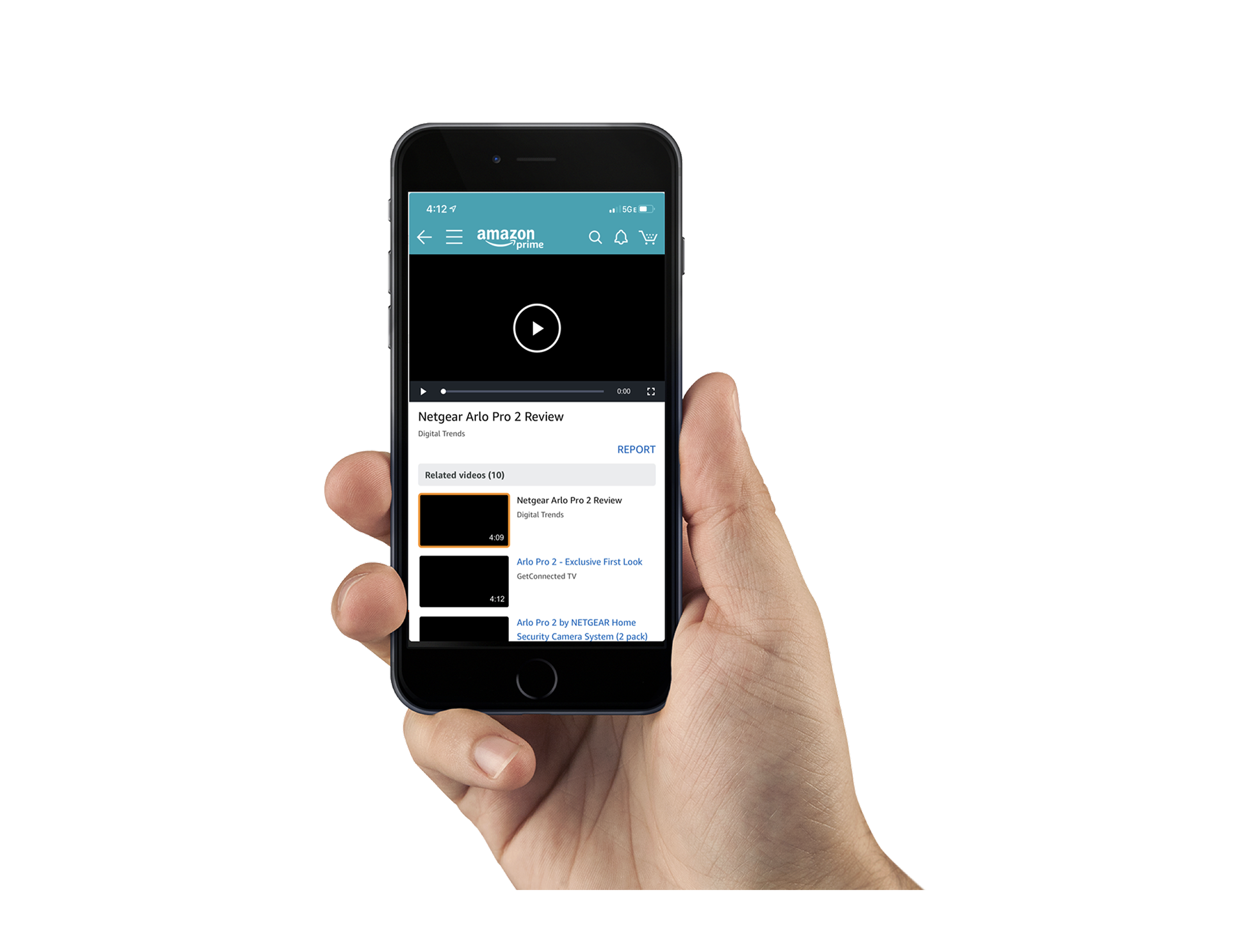
Mobile Video Lightbox
CommerceA way to browse and discover video content directly within the shopping experience.
Creator Portal
CommerceLetting customers add videos to their favorite products through a related-video widget.
Oracle Single Pane
Cloud operationsA unified workspace for managing many service instances without parallel tabs.